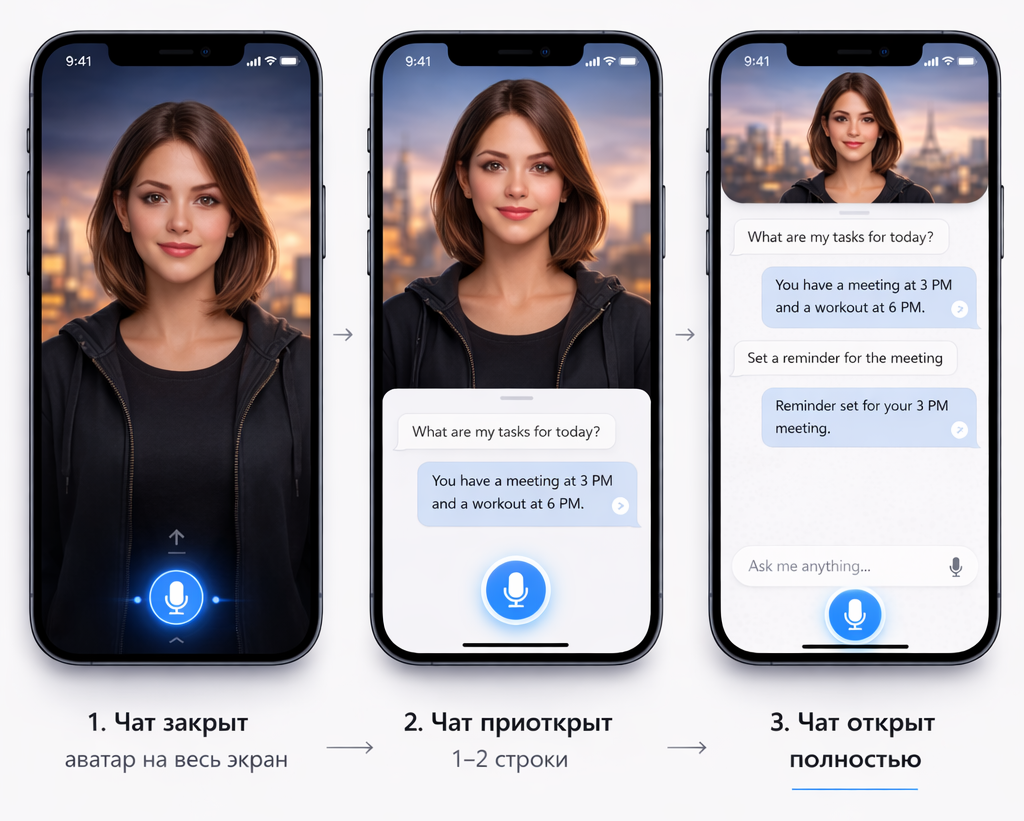
Voice control your phone, smart memory, file search, calls and SMS — all through natural conversation.
Android 8.0+ · Internet connection required
Implemented features in the current version of the app.
BotMode — one button, continuous listening. Speak naturally, the assistant understands pauses and intent.
Remembers facts about you between sessions. Automatically extracts and stores important information.
Live weather, news, exchange rates — via Gemini grounding in real time.
"Find my boarding pass" — searches PDFs and photos on your device by meaning, not exact name.
"Call Mom", "Text Denis that I'll be late" — works directly with your contacts.
"Open Telegram", "Launch Maps" — open any app by voice.
Photograph anything — the assistant describes the content via Gemini Vision.
Create and save notes by voice. Structured content appears as a separate card.
"Remind me at 6 PM about the meeting" — sets system reminders by voice.
"How much battery?", "Where am I?", "What's my WiFi?" — device status, location, network info by voice.
Parses time, contacts, amounts from speech before the AI even sees it. "In 2 hours" becomes an exact timestamp instantly.
Calls and SMS require your confirmation before executing. "Call Mom?" — say Yes or No.
We built this assistant with a simple principle: your personal data belongs only to you.
Your contacts, messages, files, notes, and memory — everything stays on your device in an encrypted local database. Our server never stores, reads, or has access to your personal information. It only relays your voice query to the AI model and returns the response — nothing is saved.
Notes, checklists, memory, and chat history are stored in an encrypted database directly on your phone. If you delete the app — all data is gone. We have no backups of your data.
The backend is a transparent proxy: it receives your text query, forwards it to Google Gemini, and returns the answer. No logs, no message history, no user profiles on our side.
Speech recognition runs through Android's built-in STT engine on your device. We never receive, record, or store your voice. Only the recognized text is sent to get an AI response.
When you say "call Mom", the app looks up the contact locally and makes the call through your phone. Contact names, numbers, and messages never reach our server.
Each permission is used for a specific feature: microphone for voice, contacts for calls, camera for vision. Nothing is accessed in the background. You can revoke any permission at any time.
We're building toward fully open-source. The app's architecture is designed so you can inspect exactly what data goes where. No hidden analytics, no ad trackers, no third-party SDKs.
Completed milestones and upcoming features.
Continuous listening, instant response, sentence-by-sentence delivery.
Calls, SMS, contacts, alarm, reminders, file search, camera, app launcher, battery, location, network, WiFi, Bluetooth, brightness.
SlotExtractor, SafetyClassifier, ExecutionClassifier — device queries bypass LLM entirely (0ms vs 1.5s).
Notes, checklists, and full chat history stored locally on your phone. Works offline.
Qwen 2.5 runs locally via llama.cpp. Works offline, supports 29 languages.
Near-instant speech generation with smooth sentence batching. Sounds like a real person.
Patent-pending photorealistic avatar that speaks, blinks, and shows emotions — running on your phone.
Morning briefing with weather, tasks, and suggestions. Push notifications via Firebase.
"Check my email" — read, search, summarize, and respond to emails by voice.
Three levels of phone automation: Guided, Assisted, and Full Autopilot via AccessibilityService.
The app is in closed beta. Android 8.0+ required.
⬇ Download Creatora APKA quick guide to try all the main features.
Tap the mic button, say: "Hi, what's the weather today?" — the assistant should answer with live weather data.
Say: "How much battery do I have?" or "Where am I?" — should respond instantly without delay.
Say: "Remind me in 5 minutes to drink water" — you should get a notification in 5 minutes.
Say: "Call [contact name]" — the assistant will ask for confirmation before dialing. Say Yes or No.
Say: "Open Telegram" or "Open Settings" — the app should launch.
Tell the assistant something personal: "I have a cat named Luna". Later ask: "What's my cat's name?" — it should remember.
Say: "What do you see?" — the camera opens, take a photo, and the assistant describes what it sees.
Found a bug? Say: "Tell developers [your feedback]" — it goes directly to our team.
Found a bug, have an idea, or want to become a tester — write to us.
Or write directly: hello@creatora.app · support@creatora.app